I Replaced My Phone with a $25 E-Ink Device
I’ve been trying to slow down for a while now. Writing things down on paper first, then deciding what to do with them, has helped a lot. But the thing that kept pulling me back was my phone. Every time I picked it up for something useful, like checking what was on today, I’d put it down twenty minutes later with no idea where the time went.
So I tried something different. I left the phone in a drawer and started carrying a $25 e-ink device from M5Stack instead: the PaperDIY, running paperOS, a firmware I’ve been building for it.
This is what it does, what it doesn’t.
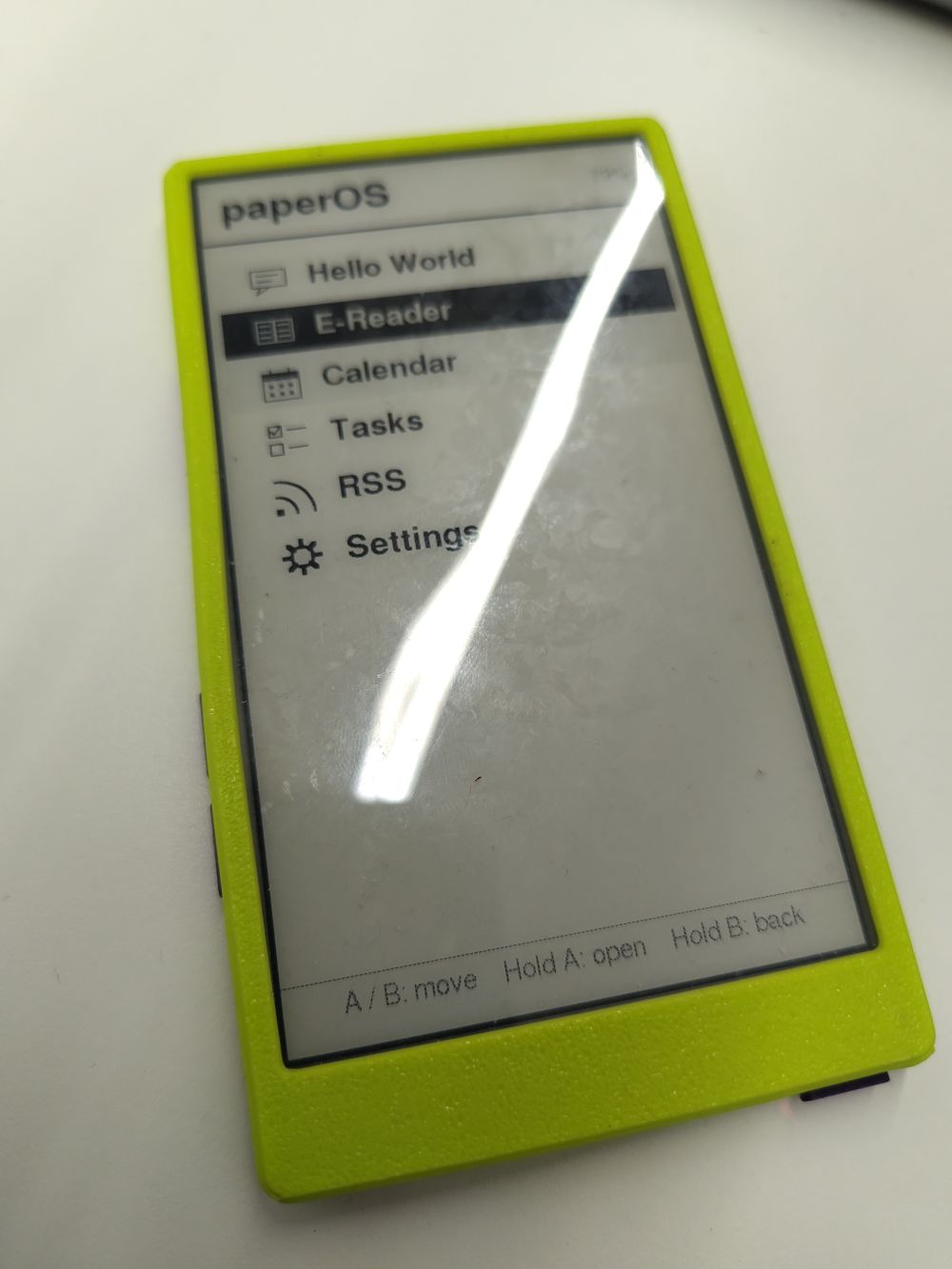
What I actually used my phone for
When I was honest with myself, the useful things I did on my phone came down to four or five things:
- Reading books.
- Checking my calendar to see what’s coming up.
- Checking my tasks in Mindwtr, to see what I should be focusing on.
- Reading the news via RSS Feeds
- Checking the weather
Everything else was either something that could wait until I was at a computer, or something I didn’t need to be doing at all. A device that did those three things well, and nothing else, might be all I needed. I like devices that are used for a single purpose and nothing else. This helps keep distractions to a minimum. My phone is for communicating, my paperdiy for mindful consumption.
The hardware
The PaperDIY is a small board from M5Stack built around an ESP32-S3 with a 4.7" e-paper screen. It has Wi-Fi, Bluetooth, an SD card slot, a battery and two buttons on the side. That’s it. No touch screen, no camera, no app store.
That’s exactly what I wanted. The screen is easy on the eyes, it looks like paper, and it keeps its image with the power off.
paperOS
Out of the box the PaperDIY doesn’t do much on its own; it’s a DIY board after all. So I wrote paperOS, a small app launcher for it. I introduced it a few weeks ago when it was only a name badge. Since then it’s grown into something I can use every day.
The interface is simple, two buttons. It sounds limiting, but after a day it becomes second nature, and it means every app works the same way.
Setup is one file
All the settings live in a single config.toml on the SD card: your Wi-Fi, time zone, calendars, feeds and sync server. No accounts, no companion app. Edit the file on a computer, put the card back, and you’re done.
[time]
  timezone = "Europe/Berlin"

[wifi]
  ssid = "MyNetwork"
  password = "secret"
Wi-Fi is only switched on while something is downloading, then switched off again. That’s a big part of why the battery lasts.
Reading books
This is the feature I use most. Copy EPUB files into a books folder on the SD card and they show up in the E-Reader as a grid of covers, three to a row, sorted by title. Under the grid you see the selected book’s title and how many pages you have left.
The first time you open a book, paperOS lays it out into pages for the screen and caches the result, so after that it opens straight away. Your place is saved on every page turn, so you can switch off whenever you like and pick up where you left off. The bottom of each page shows something like Page 41 of 635 and 594 pages left, which I like more than a percentage.
From the book menu you can change the font size (small, medium or large) and the line height (100% to 150%). You get a preview of your current page while you choose, and you stay at the same place in the text after changing it.
There are some limits worth knowing about. Images in books are skipped, and the fonts are ASCII-only for now, so café shows as cafe. For the novels and non-fiction I read, that’s not been a problem.
Checking my calendar
The Calendar shows the next two weeks of events from one or more iCal links. Google, Outlook, iCloud and Nextcloud all give you one. Add a block to the config for each calendar:
[[calendar.feed]]
  name = "Personal"
  url = "https://calendar.google.com/calendar/ical/.../basic.ics"

[[calendar.feed]]
  name = "Work"
  url = "webcal://outlook.office365.com/owa/calendar/.../calendar.ics"
Events are listed by day with their time and location, and if you have more than one calendar each event shows which one it’s from. Recurring events work too, including the ones that were moved or cancelled.
My favourite small touch is the weather. Add your latitude and longitude and each day’s heading shows the forecast, the high and low, and the chance of rain, from Open-Meteo, which doesn’t need an account. Now one glance in the morning tells me where I need to be and whether to bring a coat.
When you open the Calendar it shows the last saved copy straight away, then downloads a fresh one in the background if it’s out of date. You’re never staring at a loading spinner.
Checking my tasks from Mindwtr
I keep my tasks in Mindwtr, and it syncs to my Nextcloud over WebDAV. paperOS reads the same file. Point it at the same folder in the config:
[sync]
  url = "https://cloud.example.com/remote.php/dav/files/dan/mindwtr/"
  username = "dan"
  password = "app-password"
Settings > Sync checks that the server accepts your username and password, so you know it’s set up right before you leave the house.
The Tasks app shows three lists:
- Today’s Focus: the tasks I’ve focused for today, in the same order as in Mindwtr.
- Next Actions: grouped by area, sorted by start date then due date, with overdue ones marked.
- Upcoming: anything starting or due in the next week.
Each task shows its date, project and contexts underneath, and you can open it to see everything: notes, checklist, tags, priority and so on.
The part that made this really work for me is that you can mark a task as done from the device. paperOS downloads the latest file, changes only that task and uploads it again, and Mindwtr picks it up on its next sync. If Mindwtr changed the file at the same moment, paperOS notices and tries again, so nothing gets lost.
A couple of things to know: repeating tasks still need to be completed in Mindwtr, and encrypted sync isn’t supported, since paperOS needs to read the plain file.
The extras
A few other things made it in too:
- RSS: reads articles from RSS and Atom feeds, newest first, and keeps track of what you’ve read. It’s text only, which turns out to be a nice way to read the news.
- Hello World: the original name badge. It greets people in five languages and introduces you.
- Sleep: after a few minutes without a button press, or a double press of the power button, paperOS switches off and leaves a random wallpaper from the SD card on the screen. Because it’s e-paper, the picture stays there with no power at all. It looks lovely sat on my desk.
What I gave up
I’m not going to pretend this replaces everything a phone does. There are no calls, no messages and no maps. When I genuinely need one of those, the phone is still with me, I just don’t reach for it as often.
But that’s the point. I tried Ubuntu Touch and missed too much. This time I didn’t try to find a different phone; I asked what I actually needed a phone for, and found that most of it fits on a $25 e-ink screen with two buttons.
What’s next
paperOS is open source and on GitHub, with prebuilt firmware on each release if you want to flash your own PaperDIY. I’m keeping the project page up to date as new versions come out.
If you’ve got one of these little boards, give it a try and let me know what you’d want it to do next.