paperOS
Hardware: M5Stack PaperDIY (ESP32, e-ink)
Status: In progress
Source: github.com/daniebker/paperOS
paperOS is a firmware for the PaperDIY, a small e-ink device from M5Stack. It turns the device into a simple app launcher for its 4.7" e-paper screen, driven entirely by the two side buttons. The latest release is 1.3.0.
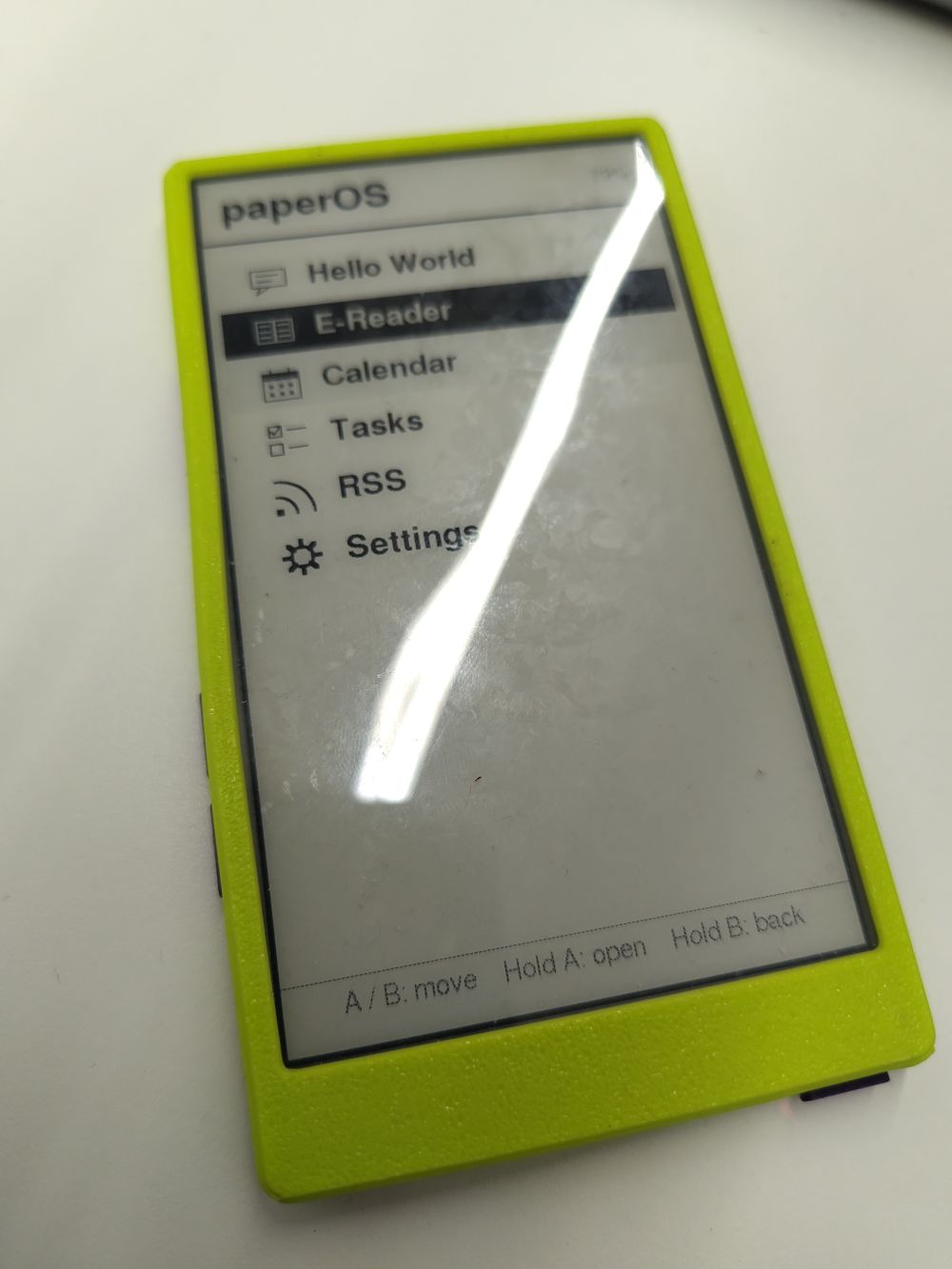
The home screen lists each app with an icon beside its name. Press A or B to move, hold A to open an app and hold B to go back.
Apps
- E-Reader: reads EPUB books from the SD card. The library shows book covers in a grid, your place is saved on every page turn, and you can change the font size and line height.
- Calendar: shows the next two weeks of events from one or more iCal links, such as Google, Outlook, iCloud or Nextcloud calendars. It can also show the weather forecast for each day.
- Tasks: shows your Mindwtr tasks from a WebDAV server, such as Nextcloud: today’s focus, next actions and what’s coming up. You can mark tasks as done from the device.
- RSS: reads articles from RSS and Atom feeds, newest first, and keeps track of what you’ve read.
- Hello World: greets you in five languages and introduces the device’s owner.
- Settings: includes a check that your sync server accepts your username and password.
Sleep
After a few minutes without a button press, or when you double press the power button, paperOS switches off to save the battery. Because e-paper keeps its image without power, it leaves a wallpaper on the screen, picked at random from the SD card.
Read more
Changelog
1.3.0 - 2026-11-15
Added
- The home screen and Settings show an icon beside each app’s name: a
speech bubble for Hello World, an open book for the E-Reader, a calendar,
a checklist for Tasks, the feed symbol for RSS, a gear for Settings and
circling arrows for Sync. Apps can draw their own by overriding
App::drawIcon(); otherwise they show the first letter of their name.
1.2.0 - 2026-11-11
Added
- Calendar shows the weather forecast under each day’s heading: the
weather, high and low temperature and chance of rain, from Open-Meteo. Set
the place in
[weather] latitudeandlongitude, and optionallyunits = "fahrenheit". The forecast is downloaded with the calendars and cached in/.cache/calendar.
1.1.0 - 2026-11-11
Changed
- E-Reader library is now a grid of book covers, three to a row, in
alphabetical order of title. A / B move back and forwards through the books.
Covers are read from each EPUB once and cached in
/books/.cache; books without a JPEG or PNG cover show their title instead. - Tasks groups Next Actions by area, under a subheading for each, in the areas’ order from Mindwtr, with tasks without an area last. A task without an area takes its project’s. In each area, tasks are sorted by start date, then due date.
1.0.0 - 2026-11-10
The first release of paperOS, an app launcher for the M5Stack PaperDIY’s 4.7" e-paper display.
Core
- Home screen that lists the apps: press A / B to move, hold A to open, hold B to go back. Shown in portrait (540x960) by default.
config.tomlread from the root of the SD card at boot, including[[array]]tables.- Battery level in the header of every screen, and a Wi-Fi icon while downloading: outlined while joining the network, filled once connected.
- Clock set over SNTP, with time zone names or POSIX TZ rules
(
[time] timezone). - HTTPS downloads over Wi-Fi (
[wifi] ssid,password), with Wi-Fi switched off between downloads. - Sleep after
[power] sleep_minuteswithout a button press, or on a double press of the power button: draws a random image from/wallpapersand switches off. A single press starts the device again. - WebDAV / CalDAV client for signing in, downloading and uploading files.
- Shared streaming HTML/XHTML to plain text parser and ASCII folding.
- Debug mode (
[Developer] debug): log files on the SD card (/debug.N.log, 256 KB each) and an explanation of Wi-Fi failures in the Calendar.
Apps
- E-Reader for EPUB books in
/books. Books are indexed once into a page cache, the last page read is saved on every page turn, and pages remaining are shown in the library and while reading. A book menu sets the font size (three sizes) and line height in a preview of the current page; both are remembered. Reading positions survive font changes and firmware updates. - Calendar for iCal links (
https://,http://,webcal://): upcoming events grouped by day, with recurring events, exceptions and moved or cancelled occurrences, converted to the local time zone. The saved agenda in/.cache/calendarshows at once, and calendars download again in the background everyrefresh_minutes. - Tasks from Mindwtr’s
data.jsonon a WebDAV server: Today’s Focus, Next Actions, and inbox, next and waiting tasks coming up within[tasks] days. Tasks can be viewed in detail and marked as done; the change is uploaded without overwriting edits made elsewhere. - RSS reader for RSS and Atom feeds: one list, newest first, with unread
articles marked and counted. Articles are laid out in pages. Feeds are saved
in
/.cache/rssand download again in the background everyrefresh_minutes. - Settings, with Sync to check the sign-in to the WebDAV server.
- Hello World sample app that greets you in five languages and introduces
the owner named in
config.toml.
Build and release
- PlatformIO project for the PaperDIY (ESP32-S3) with host unit tests
(
pio test -e native). - GitHub Actions workflow that tests and builds the firmware, and a release workflow that publishes binaries when a version tag is pushed.
- README with flashing instructions, controls and every
config.tomlsetting.