cardputerOS
Hardware: M5Stack Cardputer ADV (ESP32-S3), with an external 2.8" ILI9341 display
Status: In progress
Source: github.com/daniebker/cardputerOS
cardputerOS is a small operating system for the M5Stack Cardputer ADV, the credit-card-sized computer with a built-in keyboard. It uses an external 2.8" display, wired to the Cardputer’s expansion header, as its main screen, while the built-in screen shows a short status summary. It has a launcher, a status bar and apps that keep running in the background. The latest release is 0.8.0.
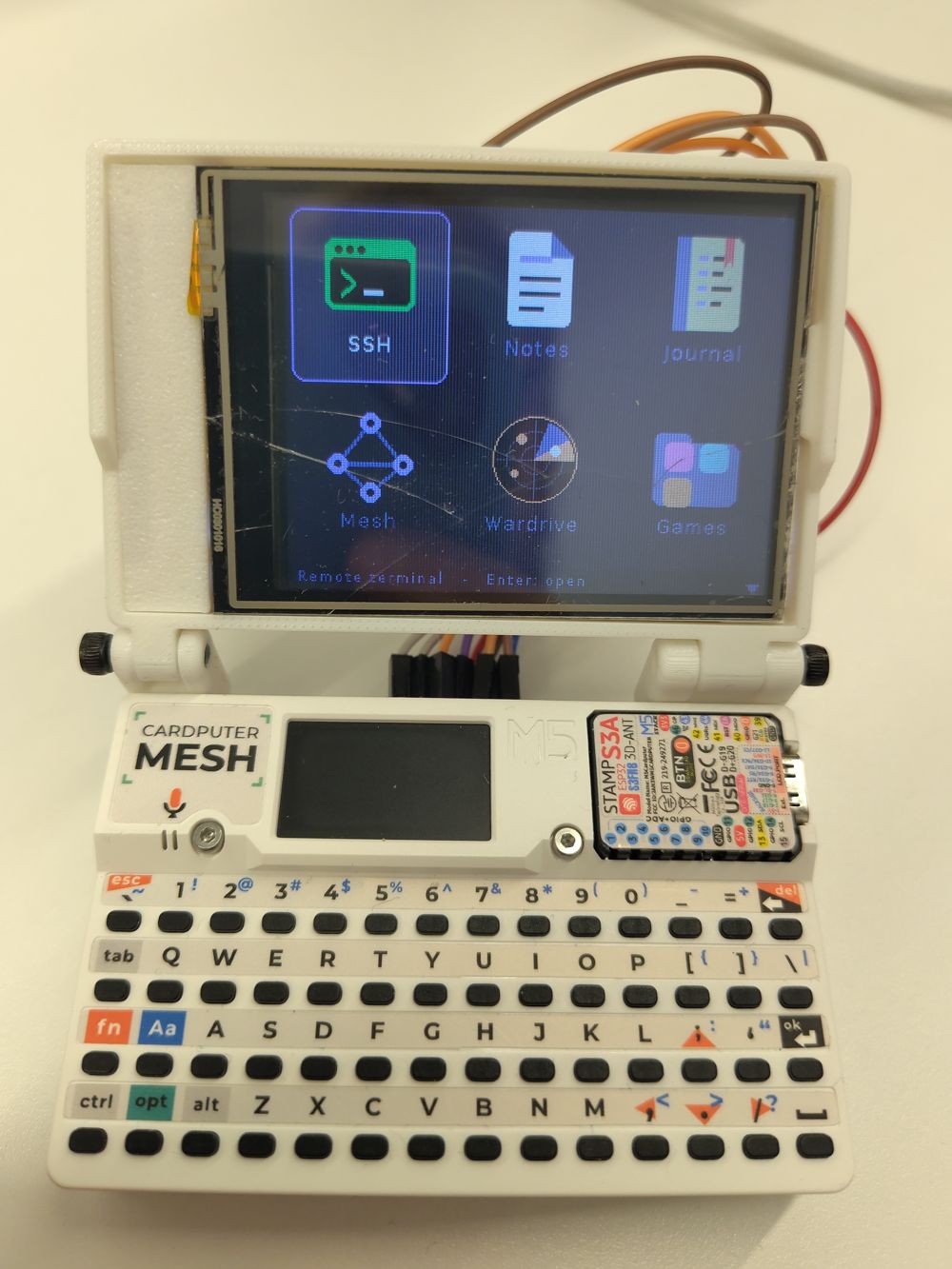
Apps
- SSH: a built-in SSH client, with host keys checked the first time you connect.
- Notes: a notes app with a vi-style editor and WebDAV sync.
- Journal: type a line and it’s added to today’s Markdown file with the current time.
- Mesh: a text messenger for Meshtastic. It connects over Bluetooth to a Meshtastic node, so the Cardputer needs no LoRa hardware of its own.
- Wardrive: lists the Wi-Fi networks and Bluetooth devices around you, and keeps scanning in the background.
- Games: Sudoku, a roguelike called Ember Crown, and Merge, a sliding tile puzzle.
Saved secrets, such as Wi-Fi and SSH passwords, are encrypted with a passphrase. You can install cardputerOS from your browser with the web flasher.
Changelog
[0.8.0] - 2026-11-13
Added
- Stored secrets are encrypted with a passphrase asked for at boot: Wi-Fi passwords, SSH hosts and passwords, the Notes and Journal WebDAV passwords and the SSH private key (AES-256-GCM, key wrapped with PBKDF2-SHA256). Existing secrets are encrypted on the first start. Settings → Passphrase changes it; Esc at the unlock prompt deletes the secrets if the passphrase is forgotten.
- Brute force protection: after 3 wrong passphrases in a row, each further try waits 30 seconds, doubling up to an hour. The count survives restarts.
[0.7.1] - 2026-11-13
Changed
- The external display’s backlight is now driven by G13 (EXT pin 12) by default, so it dims and switches off in sleep. Move the display’s LED wire from 5VOUT to pin 12 to use this.
[0.7.0] - 2026-11-13
Added
- Wardrive: lists the Wi-Fi networks and Bluetooth LE devices around and
tracks every one seen in a session (signal, channel, security, manufacturer,
first and last seen). With a microSD card inserted, new devices are logged
to a WiGLE-format CSV file under
/cardputerOS/wardrive/(no location, as there is no GPS); without a card nothing is saved.
Changed
- Mesh reports when Bluetooth is in use by another app instead of failing.
[0.6.0] - 2026-11-13
Added
- Web flasher on GitHub Pages: install or update cardputerOS from Chrome or Edge over USB, keeping notes, keys and settings.
- GitHub Actions: tests and firmware build on every push; a GitHub release with the firmware images when a version tag is pushed.
[0.5.0] - 2026-11-13
Added
- Merge, a sliding tile puzzle: merge equal number tiles on a 4x4 board and aim for 2048. Undo of the last move, best score kept.
- Home screen folders. Sudoku, Ember Crown and Merge are now in a Games folder; Esc or Backspace goes back to the home screen.
[0.4.0] - 2026-11-13
Added
- Journal: quick timestamped entries, one Markdown file per day, synced with a WebDAV folder. Days changed on the device and elsewhere are merged entry by entry.
- Mesh, a Meshtastic text messenger: connects to a Meshtastic node over Bluetooth LE (scan, PIN pairing, automatic reconnect), shows channels, direct messages and the node list, sends and receives text with delivery marks, and keeps recent messages across restarts. New messages are announced on the built-in screen while the app is in the background.
- Battery saving (Settings): on battery the screen dims and the device goes
into light sleep after configurable times without a key press. Any key or
the G0 button wakes it; apps save first and Wi-Fi reconnects afterwards. The
device stays awake while an SSH connection is open. The external display’s
backlight can be dimmed and switched off too if its LED pin is wired to a
GPIO (
EXT_TFT_BL).
[0.3.0] - 2026-11-12
Changed
- The home screen is a grid of app icons instead of a list. Icons are drawn from shapes (no image files); running apps show a green dot, and the selected app’s description is shown at the bottom.
Fixed
- The small (4x6) terminal font showed no readable text: its characters were drawn above their row and cut off.
[0.2.0] - 2026-11-12
Added
- Ember Crown, a roguelike: eight generated dungeon levels, field of view, ten kinds of monsters, potions, scrolls, weapons and armor, permadeath, and a saved run that survives reboots. The game rules are tested on the host by a bot that plays hundreds of games.
[0.1.0] - 2026-11-12
First release for the M5Stack Cardputer ADV with an external 2.8" ILI9341 display.
Added
- OS core
- Launcher with app switching; apps keep running in the background
(
opt+`or the G0 button returns to the launcher,xcloses an app). - App framework: one file per app, registered with
OS_REGISTER_APP. - UI toolkit: lists, text prompts, confirmations, alerts, choice dialogs.
- Status (app, Wi-Fi, IP, battery, clock) on the Cardputer’s built-in screen, leaving the whole external display to the apps.
- Keyboard driver with key repeat and an
fnlayer (Esc, arrows, Home/End, Page Up/Down, F1–F10, Delete). - Wi-Fi with saved networks, background auto-connect and NTP time.
- Settings: Wi-Fi, 180° screen rotation, terminal font, time zone, About (including the reasons for the last boots).
- Dracula colour scheme throughout, defined in
src/os/theme.h. opt+rresets and redraws the external display.
- Launcher with app switching; apps keep running in the background
(
- SSH
- Saved hosts, password and keyboard-interactive login.
- On-device Ed25519 key pair;
opt+kinstalls it on the connected host; the public key is also written to the SD card if one is inserted. - Trust-on-first-use host key checking with a warning when a key changes.
- xterm-compatible terminal (256 colours, line drawing, alternate screen, scrollback) with four font sizes, 80×40 down to 40×15.
- Notes
- Markdown notes with a vi-style editor: motions, counts, operators, text
objects, visual mode, search, undo/redo and
.repeat. - Word wrap and Markdown highlighting (headings, lists, checkboxes, quotes, code).
- Two-way sync of
.mdfiles with a WebDAV folder (e.g. Nextcloud), with conflict copies and trust-on-first-use HTTPS certificate pinning.
- Markdown notes with a vi-style editor: motions, counts, operators, text
objects, visual mode, search, undo/redo and
- Sudoku
- Generated puzzles with exactly one solution in three difficulties.
- Pencil marks, automatic marks, undo, hints, conflict highlighting, checking, timer, best times; the game in progress survives reboots.
- Development
- Host unit tests (
pio test -e native) for the terminal emulator, the editor engine and layout, the WebDAV/HTTP code and the Sudoku engine. - Debug build (
-DSCREENSHOT_DEBUG) that renders off-screen and accepts keystrokes and screenshot requests over USB serial.
- Host unit tests (
Hardware notes
- Power the display (VCC and LED) from EXT pin 6 (5VOUT). Pin 2 (5VIN) only carries 5 V while USB is connected, so the display does not start on battery.